SDK Payment flows
If you're complete beginner to Digital Payments, take a look at this Payments 101 blog to get familiar with terminologies.
Payments flow
There are multiple stages in a Payment flow depending on the payment methods that are involved. Considering an one-time payment method where there was no redirection involved, the following stages form the Payment flow:
a) Creating a Payment: When your customer wants to checkout, create a payment by hitting the payments/create endpoint. Fetch and store the payment_id and client_secret
b) Loading the SDK: After your customer checks out, load the OrchestratorX SDK by initiating it with the client_secret and publishable_key
c) SDK being rendered: After you initiate the SDK, the SDK makes several API calls involving the /sessions and /payment_methods endpoints to load relevant payment methods and any saved cards associated with the customer
d) Customer enters the payment method data: After the SDK is fully rendered, your customer would choose a payment method and enter the relevant information and click pay
e) Confirming the payment: After the customer clicks pay, the SDK calls the payments/confirm endpoint with the customer's payment method details and post response, it displays the payment status
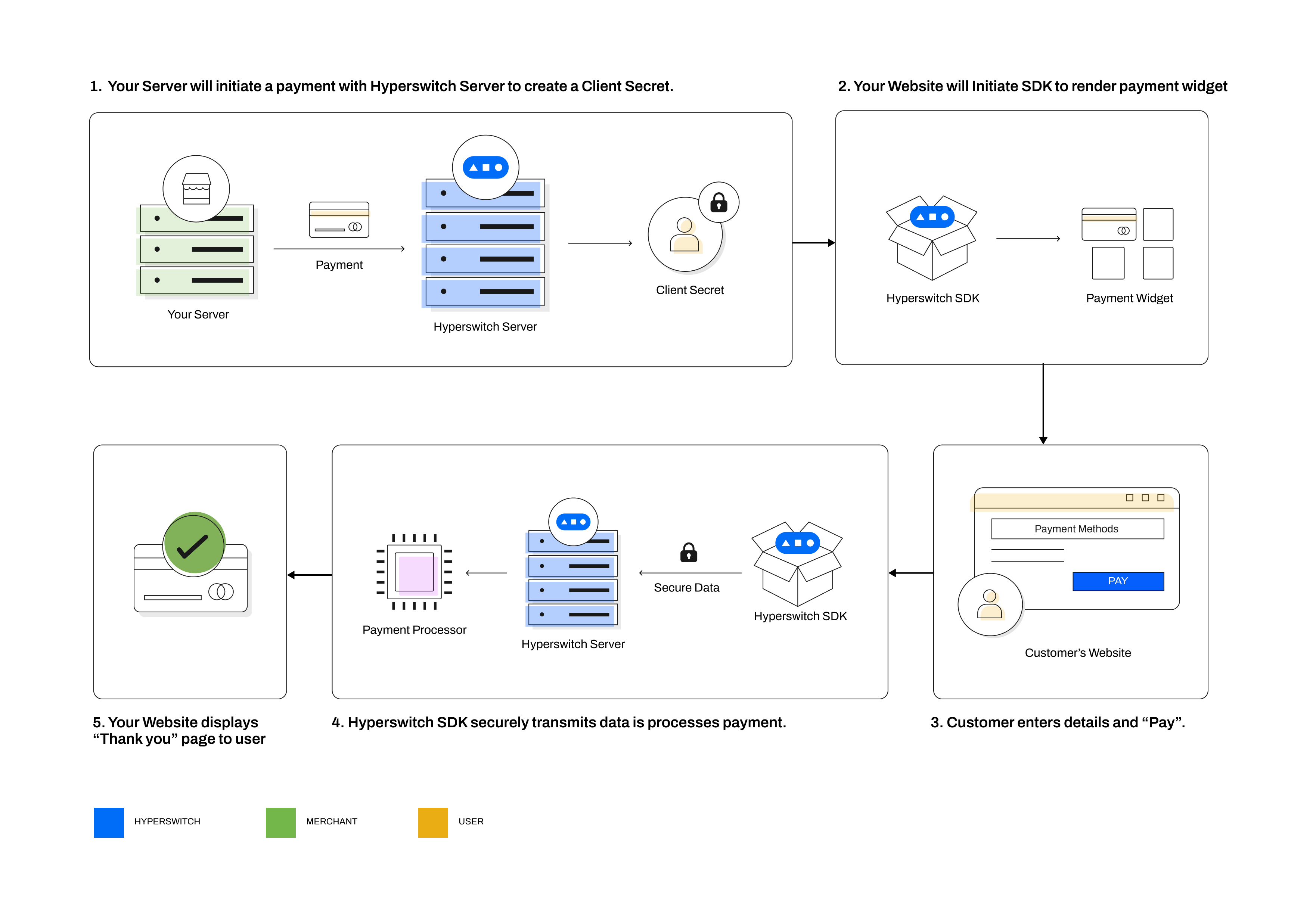
Here's a more detailed version of the payment flow:
%%{init: {
  "theme": "base",
  "themeVariables": {
    "primaryColor": "#ffffff",
    "primaryBorderColor": "#2563EB",
    "lineColor": "#2563EB",
    "secondaryColor": "#EFF6FF",
    "tertiaryColor": "#DBEAFE",
    "fontFamily": "Inter, system-ui, sans-serif",
    "fontSize": "14px",
    "textColor": "#000000",

    "actorBkg": "#346DDB",
    "actorBorder": "#999999",
    "actorTextColor": "#ffffff",

    "signalColor": "#000000",
    "signalTextColor": "#696969",

    "labelBoxBkgColor": "#346DDB",
    "labelBoxBorderColor": "#2563EB",
    "loopTextColor": "#000080"
  }
}}%%
sequenceDiagram
    participant MS as Merchant Server
    participant MC as Merchant Client
    participant SDK as OrchestratorX SDK
    participant HS as OrchestratorX Server
    participant PS as Processor Server

    MS->>HS: payments/create (amount, currency, api_key)
    HS-->>MS: payments/create response (payment_id, client_secret)
    MS->>MC: pass client_secret, publishable_key
    MC->>SDK: initiate SDK (client_secret, publishable_key)
    SDK->>HS: /payment_methods_list (client_secret)
    HS-->>SDK: /payment_methods_list response (eligible payment methods)
    Note over SDK: Display payment sheet with eligible methods
    Note over SDK: Customer selects desired payment method <br />(Say Card and Enters their Card Details)
    SDK->>HS: payments/confirm (client_secret, payment_method_data)
    HS->>PS: payments/confirm to processor (with merchant credentials)
    PS-->>HS: payments/confirm response (status)
    HS-->>SDK: payments/confirm response (status)
    SDK-->>MC: return to return_url with status
How does Payment flow vary across Payment methods?
| Customer Action | Direct/Redirect flows | Payment- finalized immediately | Payment- finalized later |
|---|---|---|---|
| Customer action required before payments/ confirm | Within OrchestratorX SDK |
|
|
| Customer action required before payments/ confirm | 3rd party Redirect/SDK |
| |
| Customer action required after payments/ confirm | 3rd party Redirect |
|
|
Functionalities provided by OrchestratorX
| Accept online payments | Get started with accepting one time payments globally on your online store | onlinePayments.jpg | quickstart | |
| Setup mandates & recurring payments | Setup payments for a future date or charge your customers on a recurring basis | recurringPayments.jpg | save-a-payment-method | |
| Manage payouts | Facilitate payouts for global network of partners and service providers | Payment flow (1) (2).jpg | payouts | |
| Save a card during payment | Learn how you can save your customers' cards in a secure PCI compliant manner | saveCard.jpg | tokenization-and-saved-cards | |
| Manage payments on your platform / marketplace | Accept payments from your customers and process payouts to the sellers on your marketplace | marketplace.jpg | multiple-accounts-and-profiles | |
| Accept payments on your e-commerce platform | Give your Wordpress store a lightweight and embedded payment experience with the OrchestratorX WooCommerce plugin | WooComerce.jpg | woocommerce-plugin | |
| Create payment links | Accept payments for your products through reusable links without writing any code | paymentLinks.jpg | payment-links |


 (2).jpg)



What are PaymentIntent and PaymentAttempt objects and how do they work in OrchestratorX?
OrchestratorX uses the PaymentIntent object to track the status of a payment initiated by you. Since, OrchestratorX enables retrying a single payment multiple times across different processors until a successful transaction, we track each of these payment attempts through separate PaymentAttempt objects.
While PaymentIntent and PaymentAttempt have their own state machines, the various states in PaymentAttempt are also constrained by their respective mapping to the PaymentIntent statuses.
PaymentIntent state machine:
The following is an abridged version of the PaymentIntent state machine flow that covers majority of the above payment use-cases.
flowchart TD
A{PaymentsAPI} --> |amount,currency|RequiresPaymentMethod
RequiresPaymentMethod -->|payment_method| RequiresConfirmation
RequiresConfirmation --> |confirm| Processing
Processing --> AuthType{auth type\nselection}
AuthType --> |3ds| RequiresCustomerAction
AuthType --> |no-3ds| CaptureMethod{capture method\nselection}
CaptureMethod --> |manual| RequiresCapture
CaptureMethod --> |automatic| Succeeded
RequiresCustomerAction --> CustomerAction{customer_action\nresult}
CustomerAction -->|success| CaptureMethod
CustomerAction -->|failure| Failed

RequiresCapture --> |capture|Succeeded
PaymentAttempt state machine:
The following is an abridged version of the PaymentAttempt state machine flow that covers majority of the above payment use-cases.
flowchart TD

AuthenticationFailed
AuthenticationPending
AuthenticationSuccessful
Authorized
AuthorizationFailed
Charged
Voided
CaptureInitiated
CaptureFailed
Pending
PaymentMethodAwaited
ConfirmationAwaited
DeviceDataCollectionPending

A{PaymentsAPI} --> |amount,currency|PaymentMethodAwaited
PaymentMethodAwaited -->|payment_method| ConfirmationAwaited
ConfirmationAwaited --> |confirm| Pending

%% Before calling the connector change status to Pending
Pending --> CallConnector{CallConnector}
CallConnector -->|Success| AuthType{auth_type}
CallConnector -->|Fail| AuthorizationFailed
AuthType --> |no-3ds| CaptureMethod{capture_method}
AuthType --> |3ds| DeviceDataCollectionPending
DeviceDataCollectionPending --> |CollectDeviceData|AuthenticationPending --> Authenticate{Authenticate}
Authenticate --> |Success| AuthenticationSuccessful --> CaptureMethod{capture method}
Authenticate --> |Failure| AuthenticationFailed

%% Capture
CaptureMethod --> |automatic| Charged
CaptureMethod --> |manual| Authorized

Authorized --> |capture| CaptureInitiated --> Capture{Capture at connector}
Capture -->|Success| Charged
Capture -->|Failed| CaptureFailed

%% Payment can be voided after calling the connector but not charged
%% This will not void the payment at connector
DeviceDataCollectionPending -->|void| Voided
AuthenticationPending -->|void| Voided

%% Voiding a payment after it is Authorized will void at connector