OrchestratorX SDK + External Vault
In this approach, the OrchestratorX SDK is used to capture card details, but card storage and tokenization are handled by an external vault. OrchestratorX backend orchestrates payments using tokens issued by the external vault.
The merchant configures connectors and routing rules in the OrchestratorX Dashboard. OrchestratorX backend translates orchestration decisions into PSP specific requests using the provided external vault tokens.
Payment and Vault flow for 'New' customer
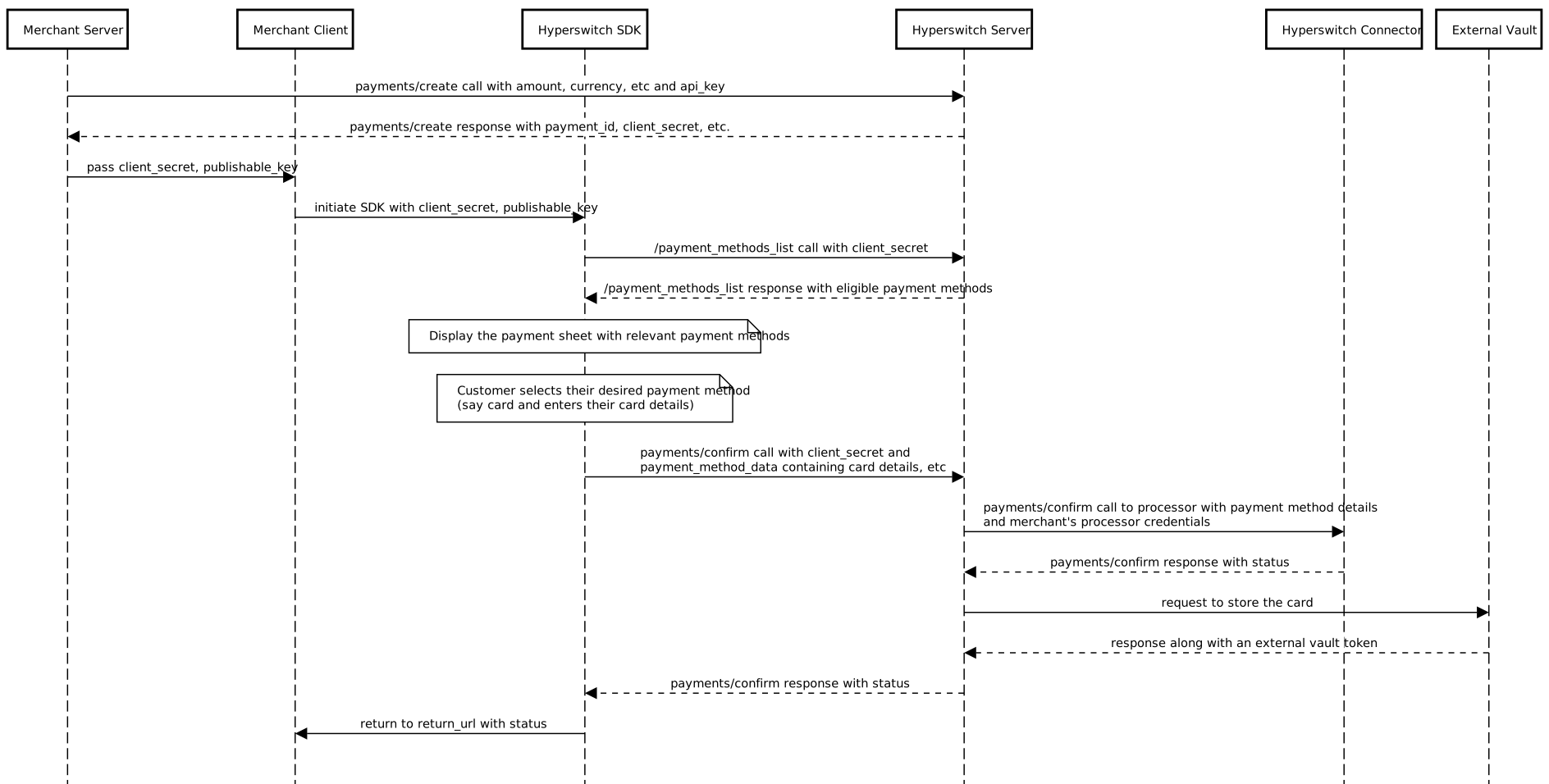
1. Create a Payment Intent
Your Merchant Server sends a request to the OrchestratorX Server containing the transaction details (amount, currency, etc.). OrchestratorX records this intent and returns a client_secret. This secret is a secure identifier used to manage the payment session safely on the frontend.
2. Initialize the Payment Sheet
Your Merchant Client (frontend) uses the client_secret to initialize the OrchestratorX SDK. The SDK then requests a list of available payment methods from the OrchestratorX Server, which filters them based on your configuration and the customer's eligibility (e.g., location or currency).
3. Customer Selection & Data Entry
The SDK displays the payment interface to the customer. Once the customer selects a payment method (such as entering credit card details), the SDK captures this information. Note: This data is handled within the secure SDK environment, ensuring sensitive details do not pass through your servers.
4. Payment Confirmation
When the customer clicks "Pay," the SDK sends a confirmation request to the OrchestratorX Server. OrchestratorX then communicates with the designated Processor Server (e.g., Stripe, Adyen) to authorize the transaction using your stored merchant credentials.
5. Secure Card Vaulting
After the processor confirms the payment is successful, OrchestratorX sends the card details to an External Vault. The vault stores the information securely and returns a unique payment_method_id. This allows for secure, "one-click" future transactions without needing to re-enter card details.
6. Status Finalization & Redirect
The OrchestratorX Server sends the final transaction status (Success or Failure) back to the SDK. Finally, the SDK redirects the customer to your specified return_url, where you can display a confirmation message and proceed with order fulfillment.
Payment and Vault flow for 'Repeat' customer
-913768f9bb401dd0912c8a664f9d5a6c.svg)
1. Session Initialization
Similar to a standard transaction, the process begins when your Merchant Server calls the payments/create API. OrchestratorX generates a payment_id and a client_secret, which your server then passes to your frontend.
2. Identifying the Customer
When the OrchestratorX SDK initializes, it recognizes the returning customer. Instead of prompting for new card details, the SDK retrieves a list of eligible saved payment methods from the OrchestratorX Server.
3. Selection of Stored Credentials
The SDK presents the "Payment Sheet" to the customer, displaying their saved cards. The customer selects their preferred card and initiates the payment.
4. Secure Retrieval from Vault
Upon confirmation, the OrchestratorX Server does not ask the customer for their card number. Instead, it sends the payment_method_id to the External Vault. The vault identifies the record and securely releases the raw card data back to the OrchestratorX Server for the duration of the transaction.
5. Payment Execution (Connector)
The OrchestratorX Server forwards the raw card data, along with your merchant credentials, to the OrchestratorX Connector (the integration point for your chosen processor). The processor validates the funds and authorizes the charge.
6. Transaction Finalization
The connector returns the transaction status (e.g., "Succeeded" or "Failed") to the OrchestratorX Server. This status is passed down to the SDK, which then handles the final redirect to your return_url.
Integration Documentation: